How I Built a Voice Agent with Murf AI
A complete journey on how I built a voice agent using Murf AI and LiveKit.


Yo!
I still remember scrolling through Reddit as usual when I came across a post about a 10-Day Voice Agent Challenge. Since it sounded intriguing, I decided to jump in, and honestly, I don't regret that decision at all.
My agent's name is Johan, and I gave him a fully professional personality because that best represents Johan's character.
Why I Built It
I've been learning German through YouTube playlists and listening to German podcasts. However, they were never quite enough because I needed a real partner to converse with. As an extrovert, I'm not shy about talking, but finding someone to practice conversational German with isn't easy.
The Solution
I built Johan (aka the Deutsch Tutor), an AI powered voice agent designed to guide you through your German learning journey. It converses with you in German first, but if you don't understand, it translates into English. Best of all, it corrects your grammar and pronunciation on the fly while retaining your conversation state so you can pick up right where you left off!
Under the Hood
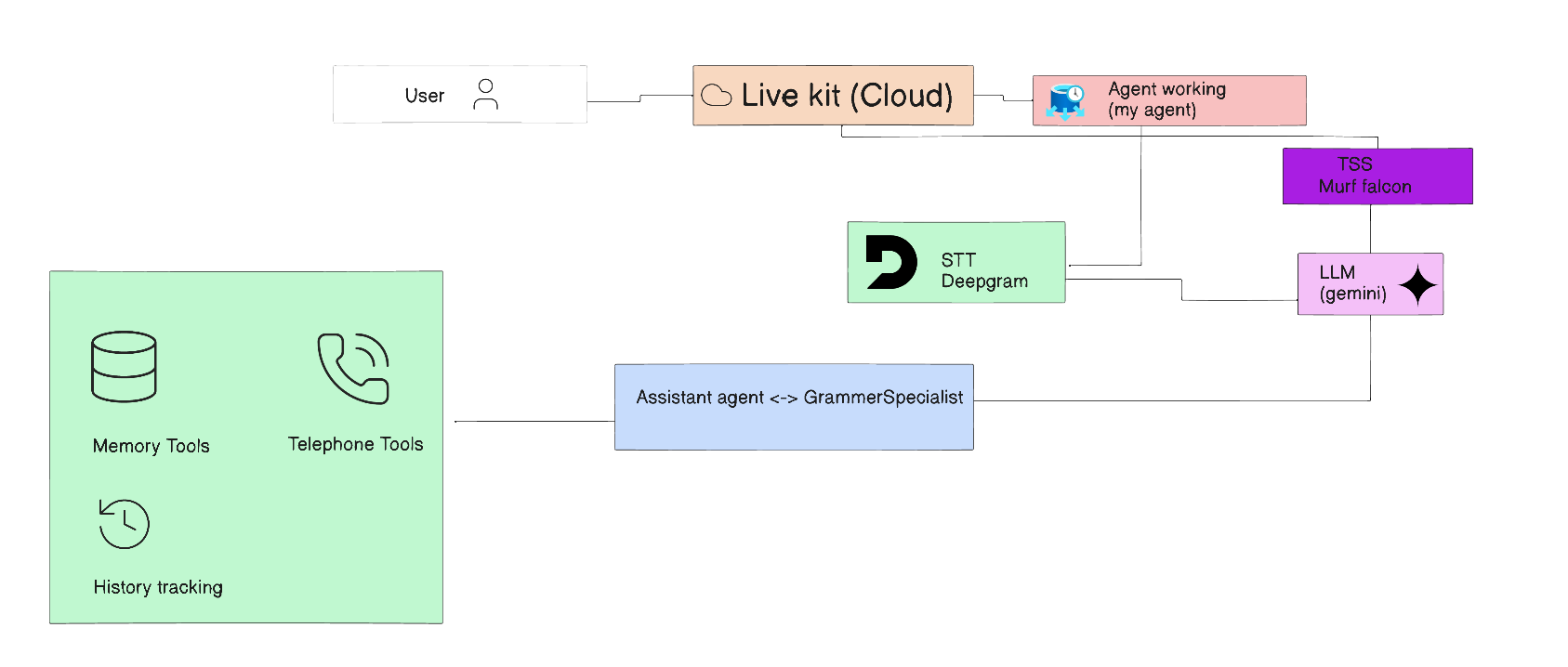
This is the current architecture of the project.
- Session Management: A user connects via LiveKit. The agent worker determines inbound vs. outbound routing and initializes the session.
- Voice Pipeline Loop: Deepgram (Speech-to-Text) → Gemini (Reasoning & Response Generation) → Murf AI (Text-to-Speech). Voice Activity Detection (VAD) seamlessly handles turn-taking.
- Dual-Agent Brain: The primary Assistant handles general conversations by default and hands off to the
GrammarSpecialistwhen deep grammar analysis is required, before control returns to the primary agent. - Auxiliary Tools: Integrated memory management (remembering/forgetting user facts), human escalation protocols (pinging support), telephony integration (call termination, voicemail detection), history lookup, and call tracking metrics.
- Persistence & Logging: Uses
memory.dbfor user preferences/facts,human_help.jsonfor support escalations (read by the frontend inbox), andcall_metrics.jsonfor session analytics.
Key Features & Specialist Mode
One feature that significantly enhances the overall UX is Specialist Mode. Whenever you get stuck on a tricky concept or want an in-depth breakdown, you can simply tell the agent. It dynamically switches to a specialist persona with a distinct voice (in this case, Nikhil) to provide deeper explanations so you gain a crystal-clear understanding.
Problems I Ran Into & How I Overcame Them
Let's be real: just like life, software engineering isn't a fairytale where everything works smoothly on the first try.
On Day 4, our task was to implement long-term memory for our voice agent. Initially, my instinct was to use PostgreSQL hosted on Neon DB because I was familiar with it (or so I thought!). However, after encountering multiple runtime errors, I realized I was over-engineering the solution. I pivoted to a lightweight SQLite database. That taught me a crucial lesson: you don't always need a complex tech stack make it work first, and optimize later.
class MemoryStore:
    def __init__(self, db_path: str | Path | None = None) -> None:
        self._db_path = Path(db_path) if db_path is not None else _DEFAULT_DB_PATH
        self._db_path.parent.mkdir(parents=True, exist_ok=True)
        self._lock = threading.Lock()
        self._conn = sqlite3.connect(self._db_path, check_same_thread=False)
        self._conn.row_factory = sqlite3.Row
        with self._lock:
            self._conn.execute(
                """
                CREATE TABLE IF NOT EXISTS users (
                    user_id TEXT PRIMARY KEY,
                    name TEXT NOT NULL,
                    language_preference TEXT NOT NULL DEFAULT '',
                    facts TEXT NOT NULL DEFAULT '{}',
                    last_interaction TEXT NOT NULL
                )
                """
            )
This class initializes a thread safe SQLite database connection, ensuring the target directory exists and setting up the users table.
Want to Build It Yourself?
Enough about my journey! Do you find this project cool and want to build it yourself?
Prerequisites
- Python 3.10+
- Node.js 18.0+
- pnpm
- A LiveKit Cloud account
- Clone the repository from GitHub:
git clone https://github.com/AarishMansur/murf-livekit-starter- Create two
.env.localfiles: one infrontend/and another inbackend/. Obtain your API credentials from their respective service dashboards and configure them:
LIVEKIT_URL=your_live_kit_url
LIVEKIT_API_KEY=your_live_kit_api_key
LIVEKIT_API_SECRET=your_live_kit_api_secret
MURF_API_KEY=your_murf_api_key
DEEPGRAM_API_KEY=your_deepgram_api_key
GOOGLE_API_KEY=your_gemini_api_key
DATABASE_URL="your_neondb_connection_string"
HISTORY_API_BASE_URL=https://history.muffinlabs.com
LIVEKIT_SIP_OUTBOUND_TRUNK_ID=your_linphone_trunk_id- Install backend dependencies:
cd backend
uv sync
uv run python src/agent.py download-files- Install frontend dependencies:
cd frontend
pnpm install- Run the application:
# macOS/Linux
chmod +x start_app.sh
./start_app.sh

# Windows (PowerShell)
.\start_app.ps1
Things I Would Improve
If given the chance to iterate further, here are the key features I'd love to add:
- Enhanced UI/UX: Introduce subtle micro animations and custom isometric SVG illustrations.
- Lower Latency: Optimize voice turn taking and response synthesis time for smoother real time interaction.
- Database Migration: Seamlessly migrate from SQLite to PostgreSQL via Neon DB without losing existing session memory.
- Multilingual Expansion: Add support beyond German to include Japanese, Spanish, and French.
Quote of the Project
80% of life is filled with hardships